
Popup and Banner Rotation: Algorithms, Setup, and Best Practices
Most guides explain why you need popup and banner rotation but miss the crucial part — how it actually works technically and which algorithms to choose for your specific use case. Popup and banner rotation isn't just randomly showing different variants to visitors; it's a strategic system that can increase conversion by 35-45% compared to displaying one variant to all users.
In this guide, we'll dissect rotation mechanics from basic concepts to advanced techniques, based on analysis of over 1 billion popup impressions in 2025-2026. You'll learn about four types of rotation algorithms with code examples, see real case studies with measurable results (+66% revenue, +52% leads), understand GDPR 2026 requirements, and get practical implementation recommendations.
What is popup and banner rotation
Popup and banner rotation is an automated system for alternating different variants of modal windows or promotional blocks on your website. Instead of showing every user the same message, a banner rotator displays various options based on predefined rules and algorithms.
The core principle of banner display systems lies in dynamic content selection from a prepared set of variants. Each visitor sees one option, chosen by a specific algorithm — random, weighted, or sequential.
💡 According to Nielsen Norman Group, rotating multiple popup variants instead of showing one static window increases conversion by 35-45% through better message-audience alignment and reduced banner blindness
Why rotation is essential
Popup rotation solves several critical challenges:
- Reducing banner fatigue: when users constantly see the same popup, they stop noticing it or become annoyed. Alternating variants maintains fresh perception.
- Testing multiple hypotheses: rotation allows you to simultaneously test several audience communication approaches — different headlines, calls-to-action, and visual styles.
- Personalization without segmentation: even random rotation gives different users different experiences, indirectly creating a personalization effect.
- Conversion optimization: using weighted rotation, you automatically show better-converting variants more frequently without stopping new idea testing.
Unlike a static popup that quickly becomes stale, a rotation system maintains communication dynamism and continuously adapts to user response.
Types and algorithms of banner rotation
Most articles stop at mentioning "random" or "sequential" rotation without explaining the mechanics. Let's break down how banner rotation algorithms actually work and when to use each one.
Random Rotation
The simplest algorithm: with each display, the system randomly selects one variant from the pool. Each banner has equal display probability.
Technical implementation: uses a random number
generator (in JavaScript — Math.random()) to select a
variant index from an array. With 5 banners, each has 20% display
probability.
When to use: during initial testing when you lack performance data. Suitable for collecting uniform statistics across all variants.
Drawbacks: doesn't account for variant effectiveness. Poor-performing banners display as often as top performers, reducing overall conversion.
Weighted Rotation
Each variant receives a weight (priority) determining its display probability. Higher-weight variants appear more frequently.
How it works: the system sums all variant weights, generates a random number from 0 to the total, then selects the variant whose range contains that number. For example, if banner A has weight 70 and banner B has weight 30, A displays 70% of the time.
When to use: when you have performance data and want to show top performers more often while continuing to test others. Ideal for continuous conversion optimization.
Benefits: balances exploitation (showing winners) with exploration (testing alternatives). Can increase conversion by 15-30% compared to random rotation.
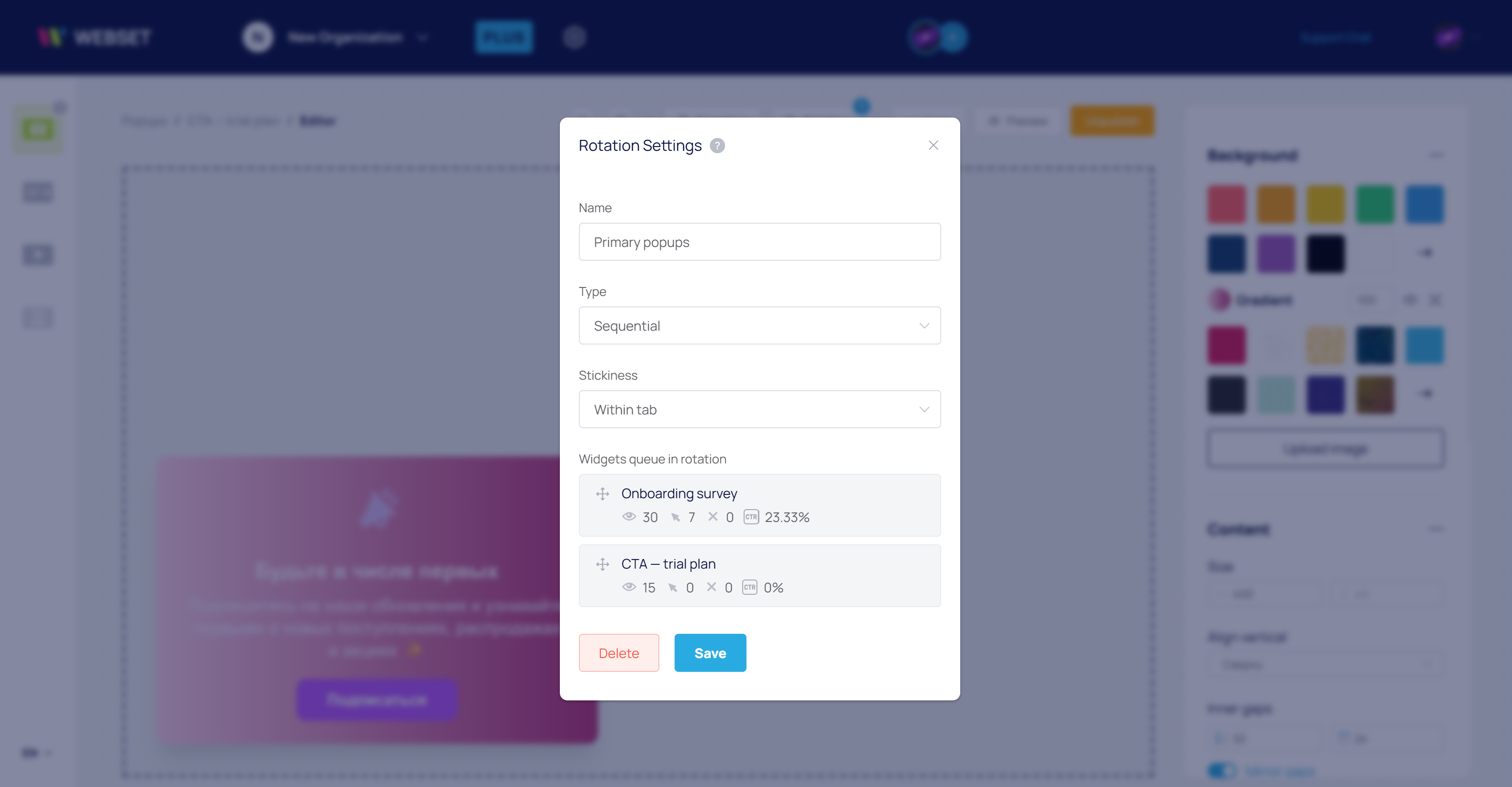
Configuring weighted rotation shouldn't require coding. WEBSET lets you set weights for each popup variant through a visual interface — simply specify the display percentage for each banner, and the system automatically distributes traffic. Built-in analytics show each variant's real-time effectiveness 🎯
Sequential Rotation (Round-Robin)
Variants display strictly in order. The first visitor sees banner 1, the second sees banner 2, the third sees banner 3, then the cycle repeats.
How it works: the system maintains a display counter,
incrementing it with each new visitor. The current variant index is
calculated as counter % variant_count.
When to use: when ensuring strictly equal impressions for each variant is crucial for A/B testing with controlled traffic distribution.
Characteristics: requires server-side state storage or cross-request synchronization. Less flexible than random rotation.
Adaptive Rotation (Multi-Armed Bandit)
Advanced algorithm that automatically increases display frequency of top performers based on real user response, minimizing "learning cost."
How it works: uses algorithms like epsilon-greedy (show best variant 90% of the time, remainder randomly) or Thompson Sampling (Bayesian probability optimization). The system constantly updates effectiveness estimates and reallocates traffic.
When to use: in high-traffic projects where rapid convergence to the optimal variant is critical. Especially effective when testing many variants (5+) simultaneously.
Benefits: finds the best variant 50% faster than classic A/B testing, minimizes conversion losses during the testing period.
🔬 According to research from Web.dev, weighted rotation based on historical performance achieves 22% higher CTR compared to random rotation, with even better results when combined with audience segmentation
Rotation vs A/B testing: differences and when to use each
Many confuse popup rotation with A/B testing. While both techniques involve showing different variants to users, they pursue different goals and have fundamental technical differences.
Key distinctions
A/B testing is a statistical experiment with clear hypotheses and success criteria. Traffic splits into groups (typically 50/50), each group sees one fixed variant, the test runs until statistical significance is reached, then a winner is declared and testing ends.
Banner rotation is a continuous optimization process without a clear endpoint. Variants display to all users in certain proportions (random or weighted), the system can dynamically adjust weights based on performance, and the process continues indefinitely.
When to use A/B testing
- Testing fundamental changes (e.g., complete popup redesign vs. minimal modification).
- You need statistical confidence for business decisions.
- Sufficient traffic for rapid significance (typically 10,000+ monthly visitors).
- Strict group isolation is important (each user always sees the same variant).
When to use rotation
- You want continuous optimization without pausing for analysis.
- Testing many variants simultaneously (5+ popup versions).
- Need to reduce banner fatigue for returning users.
- Maximizing conversion now is more important than statistically rigorous conclusions.
- You have seasonal changes or content requires regular updates.
Hybrid approach
Many advanced projects use a combined strategy: 80% of traffic goes to optimized rotation (pool of 3-5 proven variants with weighted distribution), while 20% participates in controlled A/B tests of radical new ideas. When a new test variant proves statistically significant improvement, it enters the main rotation pool, replacing the worst performer.
This approach balances immediate optimization (rotation) with long-term innovation (A/B tests), maximizing conversion without sacrificing statistical rigor.
Technical implementation: from simple to complex
Banner rotation systems can be implemented through ready-made no-code services or by writing your own banner rotation script. Let's explore both approaches.
Basic JavaScript implementation
A simple JavaScript banner rotation script for random rotation looks like this:
const popupVariants = [
  { id: 'variant-a', content: 'Subscribe and get 10% discount' },
  { id: 'variant-b', content: 'Be the first to know about new products' },
  { id: 'variant-c', content: 'Free shipping with subscription' }
];

function showRandomPopup() {
  const randomIndex = Math.floor(Math.random() * popupVariants.length);
  const selectedVariant = popupVariants[randomIndex];

  // Display logic
  displayPopup(selectedVariant);

  // Send analytics event
  trackPopupShown(selectedVariant.id);
}

// Launch on page load
window.addEventListener('load', showRandomPopup);
For weighted rotation, add weights:
const popupVariants = [
  { id: 'variant-a', content: '...', weight: 60 },
  { id: 'variant-b', content: '...', weight: 30 },
  { id: 'variant-c', content: '...', weight: 10 }
];

function selectWeightedVariant() {
  const totalWeight = popupVariants.reduce((sum, v) => sum + v.weight, 0);
  let random = Math.random() * totalWeight;

  for (let variant of popupVariants) {
    random -= variant.weight;
    if (random <= 0) return variant;
  }

  return popupVariants[0]; // fallback
}
Rotation with frequency capping
Controlling banner display frequency is critical to avoid irritating users. According to research from Smashing Magazine, optimal frequency is no more than one popup per 30 days per unique visitor.
function canShowPopup() {
  const lastShown = localStorage.getItem('popup_last_shown');
  if (!lastShown) return true;

  const daysSinceLastShown = (Date.now() - parseInt(lastShown)) / (1000 * 60 * 60 * 24);
  return daysSinceLastShown >= 30;
}

function showRotatingPopup() {
  if (canShowPopup()) {
    const variant = selectWeightedVariant();
    displayPopup(variant);
    localStorage.setItem('popup_last_shown', Date.now().toString());
  }
}
CDN-level rotation (advanced approach)
For high-traffic sites, rotation can move to the CDN level (Cloudflare Workers, AWS Lambda@Edge). This solves several problems: zero page performance impact, personalization without client-side cookies, minimal latency (decision made at edge server). Learn more about this approach in MDN Web Docs.
⚡ Edge rotation enables banner display decisions in 5-10 milliseconds before page HTML is sent to users, completely eliminating delays and improving Core Web Vitals
Best services and popup builders with rotation
If you don't want to write code yourself, ready-made services exist for creating popups with built-in rotation functionality. Let's review the most functional solutions for 2026.
WEBSET — No-code platform with advanced rotation
WEBSET offers a visual popup builder with built-in rotation system requiring no programming. The platform supports random and weighted rotation, automatic conversion tracking for each variant, integration with Google Analytics and Yandex Metrica, display trigger configuration (time, scroll, exit-intent), user-level frequency capping.
Features: the system automatically tracks each variant's effectiveness and can dynamically adjust weights for conversion optimization. No JavaScript knowledge or API work required.
Comparison of popular solutions
| Service | Rotation Type | Analytics | Price from |
|---|---|---|---|
| WEBSET | Random, weighted, adaptive | Built-in + GA/YM | Free |
| OptinMonster | Random, A/B tests | Built-in | $9/mo |
| Sumo | A/B tests only | Basic | $39/mo |
| Poptin | Random | Basic | Free |
When choosing a popup service, pay attention not just to rotation functionality but also weight configuration flexibility, automatic optimization capabilities, analytics quality, and integration with your tools.
Configuring rotation parameters: triggers, frequency, and timers
Successful popup rotation depends not only on the variant selection algorithm but also on proper display condition configuration.
Popup display triggers
A trigger determines when the system decides to show a popup. Main trigger types:
Time-based trigger
Popup appears after a specific time following page load. Optimal delay is 10-30 seconds to let users familiarize themselves with content. Too early display (immediately on load) irritates and increases bounce rates.
Scroll trigger
Display activates when scrolling reaches a specific percentage (typically 50-70%). This indicates user engagement—they're reading content and may be ready for an offer.
Exit-Intent
System tracks cursor movement toward the address bar or tab close button, showing the popup at the last moment. Effective for retaining departing users with a final offer.
Idle
If users haven't interacted with the page for a certain time (e.g., 60 seconds), this may signal an opportunity for a popup to recapture attention or offer help.
Combining triggers with rotation is complex without proper tools. In the WEBSET builder, you configure display triggers (time, scroll, exit-intent, idle) for each rotation variant without a single line of code. The system automatically tracks display frequency and prevents intrusive behavior ⚡
Banner display frequency
One critical parameter is how often the system can show popups to the same user. According to Google's recommendations, excessively frequent popups on mobile devices can negatively impact search rankings.
Frequency recommendations:
- Maximum 1 popup per 30 days per user (Nielsen Norman Group data).
- For returning users—increase interval to 60-90 days.
- After user closes popup—don't re-show for at least 7 days.
- Must implement "Don't show again" button and respect user choice.
📊 96% of mobile users abandon sites with intrusive popups that are difficult to close. Mobile popup versions must have large close buttons (minimum 44×44 pixels) and not cover the entire screen
Time-of-day popup display
An advanced strategy uses temporal rotation: different popup variants for different times of day. Morning visitors (9-11 AM) may respond better to productivity messages, afternoon users (2-5 PM) to ROI calculators, evening visitors (6-9 PM) to success stories and case studies.
Targeting and personalization with popup rotation
Rotation becomes even more effective when combined with targeting—showing specific variants to particular audience segments.
Geographic rotation
Different banner variants display to users from different regions. European visitors may see popups emphasizing GDPR compliance and explicit consent, US users different pricing offers, Russian audiences localized messages.
Real case: a European e-commerce site implemented geographic popup rotation with 5 variants per region. Email subscription conversion increased by 42%, and bounce rate decreased by 18% over 6 months.
Device and platform
Mobile popup versions should differ from desktop not just in design but content. Mobile devices work better with short messages with one clear call-to-action; desktop allows more text and multiple options.
Traffic source
Users from organic search, social media, direct traffic, and advertising are at different funnel stages. Rotate variants based on source: paid traffic—popup with ad promise, organic search—educational content, returning visitors—special offers.
Behavioral segmentation
Track user actions on site and rotate relevant banners. For example, if a visitor viewed multiple products from the "shoes" category, show a popup with a shoe discount from that category's variant pool.
Analytics integration and effectiveness tracking
Without proper analytics setup, rotation becomes a lottery. You must know exactly which variant performs best.
Metrics to track
For each rotation variant, monitor:
- Impressions: how many times the variant was shown to users.
- CTR (Click-Through Rate): percentage of users who clicked the popup button.
- Conversion: percentage completing the target action (subscription, purchase).
- Closes without action: how many users closed the popup without interacting.
- Time to action: seconds from display to click.
Setting up Google Analytics events
Create custom events for each action: popup opened (popup_rotation_shown
with variant_id parameter), button clicked
(popup_rotation_click), form submitted
(popup_rotation_conversion).
This enables funnel reports for each variant, showing where users drop off.
CRM integration
Pass information about the displayed popup variant to your CRM system along with the lead. This lets you analyze lead quality from different variants and factor this into rotation weight adjustments.
An API for rotation management enables dynamic variant weight updates based on external data—for example, if CRM shows leads from variant B convert to sales better, automatically increase its weight.
Mobile popup rotation considerations
Mobile popup versions require special approaches due to screen limitations and usage patterns.
Responsiveness and UX
Google actively penalizes sites with intrusive mobile popups in search results. Key requirements: popup shouldn't occupy full screen (maximum 70-80%), close button must be large and easily accessible, content should remain readable behind the popup.
Alternative formats
Instead of modal windows on mobile, more effective formats include: notification banners at bottom of screen (slide-in), strips at top of page (top bar), inline forms in content. These formats are less intrusive and don't block page interaction.
Performance
Mobile rotation shouldn't slow page loading. Use lazy loading for popup content, minimize JavaScript for rotation logic, consider server-side rotation for critical cases.
🚨 According to Google data, pages with intrusive mobile popups lose up to 25% of organic traffic due to ranking penalties. Ensure your mobile rotation complies with search engine guidelines
Performance benchmarks and metrics for 2026
To evaluate your rotation system's success, understanding current industry benchmarks is essential. Analysis of over 1 billion popup impressions in 2025 reveals key performance indicators.
Average conversion rates
According to research by Popupsmart based on 105 million impressions, average popup conversion rates in 2026 range from 3.49-4.65%. However, the top 10% of campaigns achieve results from 15% to 42.5%.
📊 Research by Wisepops based on 1 billion impressions found that mobile popups convert 38% better than desktop (3.75% vs 2.67%), making mobile rotation optimization critically important
Conversion by trigger types
Not all display triggers perform equally. Current data shows:
- Click triggers (when user clicks an element): 28.79% conversion — the highest rate, demonstrating clear intent.
- Delayed display (after viewing one page): 28.98% conversion — users have familiarized themselves with content and are ready to engage.
- Time on page: 25% higher conversion compared to other trigger types — effective for engaged visitors.
- Exit-intent (intention to leave site): 5.7% CTR — helps retain departing visitors.
Impact of personalization on results
Personalized rotation dramatically improves effectiveness:
- URL targeting: +152% conversion (5.80% vs 2.30%) compared to showing on all pages — relevant offers on specific pages work better.
- Custom targeting (by behavior, source, device): up to +163% conversion with results reaching 18.32%.
- Multi-step popups: +84% conversion (5.64% vs 3.07%) thanks to reduced cognitive load.
Conversion by offer types
The type of offer inside the popup significantly impacts results:
- Discounts and promo codes: 8.62% average conversion, 23.61% for best campaigns.
- Countdown timers (on mobile): +112.93% to conversion — creating urgency stimulates action.
- B2B lead magnets: 8-12% conversion — valuable content attracts quality leads.
Engagement metrics
Average interaction rate with popups is 7.05%, meaning out of 100 popup impressions, 7 users click, close, or otherwise interact with the window.
These metrics are critical for setting weights in weighted rotation algorithms — variants showing above-industry-average results should receive higher priority.
Frequently asked questions about popup rotation
How often can I show a popup to one user without being annoying?
The Nielsen Norman Group recommendation is maximum 1 popup per 30 days per visitor. For returning users, increase the interval to 60-90 days. After explicit popup closure, don't re-show for at least 7 days. If a user interacted (subscribed, filled form), exclude them from further rotation of this popup type. Use localStorage or cookies to track display history with mandatory GDPR compliance.
Do popups affect SEO and search engine rankings?
Yes, popups impact rankings through several factors. Google applies
penalties for "intrusive interstitials" — full-screen popups appearing
immediately on load on mobile devices, which can reduce positions by
20-25%. Popups affect Core Web Vitals: script loading delay worsens
LCP (Largest Contentful Paint), JavaScript processing slows INP
(Interaction to Next Paint), improper implementation causes CLS
(Cumulative Layout Shift). Recommendations: use delayed display
(minimum 5 seconds after load), avoid full-screen mobile popups, apply
async script loading, use native HTML
<dialog> element for better performance.
What's the difference between popup rotation and A/B testing?
A/B testing is a statistical experiment with clear hypotheses, success criteria, and an endpoint. Traffic splits 50/50, each group sees one fixed variant, testing runs until statistical significance (typically 1-2 weeks), then a winner is declared. Rotation is a continuous process without an endpoint. All users participate, see variants in certain proportions (random or weighted), the system can dynamically adjust weights based on performance. Use A/B testing to verify fundamental changes before making decisions. Use rotation for continuous optimization, testing multiple variants simultaneously, and reducing banner fatigue. Best approach is hybrid: 80% traffic to optimized rotation of proven variants, 20% to A/B tests of radical new ideas.
Which rotation algorithm should I choose for my site?
The choice depends on your goals and traffic volume. Random rotation suits initial stages when lacking performance data, for uniform statistics collection across variants, with low traffic (under 1,000 visitors/month). Weighted rotation is optimal when you have conversion data, for balancing exploitation of winners with exploration of new variants, with medium traffic (5,000-50,000 visitors/month). Sequential (Round-Robin) is ideal for strict A/B tests with controlled distribution, when equal sampling is critical. Adaptive (Multi-Armed Bandit) is effective with high traffic (50,000+ visitors/month), for rapid convergence to optimal variants, when testing 5+ variants simultaneously. Start with random, collect data for 2-4 weeks, then switch to weighted.
How do I set up popup rotation for mobile devices?
Mobile popups require special handling, converting 38% better than desktop but causing more negativity when poorly implemented. Key principles: use compact formats (bottom slide-in, thin top banners) instead of full-screen modal windows. Simplify forms to 1-2 fields maximum — mobile users won't fill long forms. Make close buttons large (minimum 44×44px) and easily accessible. Use delayed triggers — minimum 10 seconds after load, better on 30-50% scroll. Avoid showing immediately on site entry — Google penalizes such "intrusive interstitials." Test on real devices, not just emulators. Apply touch-friendly elements with sufficient spacing between buttons. Check performance — popup script shouldn't slow page load by more than 0.3 seconds.
How do I integrate popup rotation with Google Analytics and track effectiveness?
Set up custom GA4 events for each interaction stage. Event "popup_shown" with variant_id parameter on popup display, "popup_clicked" on CTA button click, "popup_closed" on closing without action, "popup_converted" on target action completion. Pass variant ID as a parameter in all events for data segmentation. Create custom GA4 reports: conversion funnel from display to action by each variant, CTR and conversion comparison between variants, time-to-action analysis, correlation with bounce rate. Use Google Tag Manager to manage events without changing site code. Integrate with CRM — pass variant_id with lead data to analyze lead quality from each variant. This enables rotation weight adjustments based not just on clicks but lead quality. Set up automatic alerts when variant conversion drops below average.
Do I need GDPR consent for popup rotation?
Depends on technical implementation. If you use cookies or localStorage to track displays and frequency capping, explicit user consent is required before setting these cookies. If popups collect personal data (email, name, phone), you must explicitly state processing purposes and obtain consent. If you use server-side rotation based on IP address or server session without client cookies, consent isn't required for basic functionality. If integrating with tracking tools (Meta Pixel, ad networks), you must ensure script blocking until consent is obtained. 2026 requirements: "Accept" and "Reject" buttons must be visually equal, one-click rejection without nested menus, technical cookie blocking before consent (not just banner display), logging all consent events. Recommendation: use specialized cookie consent platforms (CookieYes, OneTrust, Iubenda) for automatic consent management and script blocking.
Can I combine rotation with personalization and targeting?
Yes, and it dramatically improves effectiveness. Personalized rotation shows results 152-163% higher than untargeted popups. Combination approaches: create separate variant pools for each segment (new/returning, mobile/desktop, by traffic source), set up weighted rotation within each segment, use behavioral triggers (viewing 3+ products in category X → popup with category X discount). Geographic rotation — different variants for different regions accounting for language, currency, local promotions. Sales funnel rotation — informational popups for new visitors, product offers for brand-familiar users, urgency and discounts for warm leads. URL targeting — different rotation pools for homepage, blog, product pages, cart. Implementation: use SaaS platforms with built-in segmentation (Wisepops, OptiMonk) or integrate CDP (Segment, RudderStack) for advanced targeting. Start with simple device segmentation, then add complexity as data accumulates.
Implementation case studies: specific metrics and results
Theory matters, but real examples with measurable results demonstrate popup rotation's true potential. Let's examine detailed cases from different industries.
Case 1: E-commerce — personalized product recommendations
Company: Goldelucks Bakery (bakery with online sales).
Challenge: increase average order value and order conversion through relevant offers.
Solution: implemented AI popup rotation with personalized product recommendations based on browsing history and behavioral patterns. The system analyzed which product categories users viewed and showed corresponding offers from a pool of 8 variants.
3-month results:
- 31.56% increase in orders
- 66.2% revenue growth
- 12.27% overall order quantity increase
- 22% average order value improvement
Key insight: behavioral targeting and dynamic content in rotation dramatically outperforms static popups — using browsing data for personalization can double revenue impact.
Case 2: SaaS — exit-intent for capturing departing leads
Company: Hotjar (user behavior analytics platform).
Challenge: capture leads from visitors leaving pricing page without converting.
Solution: exit-intent popup rotating 3 lead magnet variants (free consultation, trial period, client case studies), targeted exclusively to first-time pricing page visitors.
Results:
- 408 leads collected in first 3 weeks
- 60-70 qualified leads monthly thereafter
- 3% lead-to-paying-customer conversion
- 2 new paying customers each month with recurring revenue
Key insight: exit-intent rotation on high-intent pages (pricing, cart, product details) with first-visitor segmentation generates stable quality lead flow with measurable sales impact.
Case 3: Fashion industry — gamification and format diversity
Company: Faguo (French clothing brand).
Challenge: grow email list and stimulate purchases through engaging mechanics.
Solution: rotation strategy alternating two popup types — full-screen giveaway announcements (5,000 leads/month at 17.5% CTR) and gamified Spin-to-Win popup (fortune wheel for discount).
Campaign results:
- 2,100 new email subscribers
- 25.3% average CTR
- 558 conversions (completed orders)
- £31,443 campaign revenue
Key insight: rotating between informational (announcements) and interactive (gamification) popup formats maintains fresh perception and drives both list growth and immediate revenue.
Case 4: B2B SaaS — iterative A/B testing with rotation
Company: POSist (restaurant business platform).
Challenge: increase demo requests from homepage and contact page.
Solution: systematic A/B testing of popup variants using behavioral analytics to inform next iterations. Top variants entered weighted rotation pool, worst variants replaced with new hypotheses.
Results:
- 52% increase in demo requests
- 6 successful testing iterations over 5 months
- Optimal combination: 30-second trigger + social proof + clear CTA
Key insight: systematic A/B testing of rotation variants with user behavior data enables 50%+ conversion growth through incremental improvements.
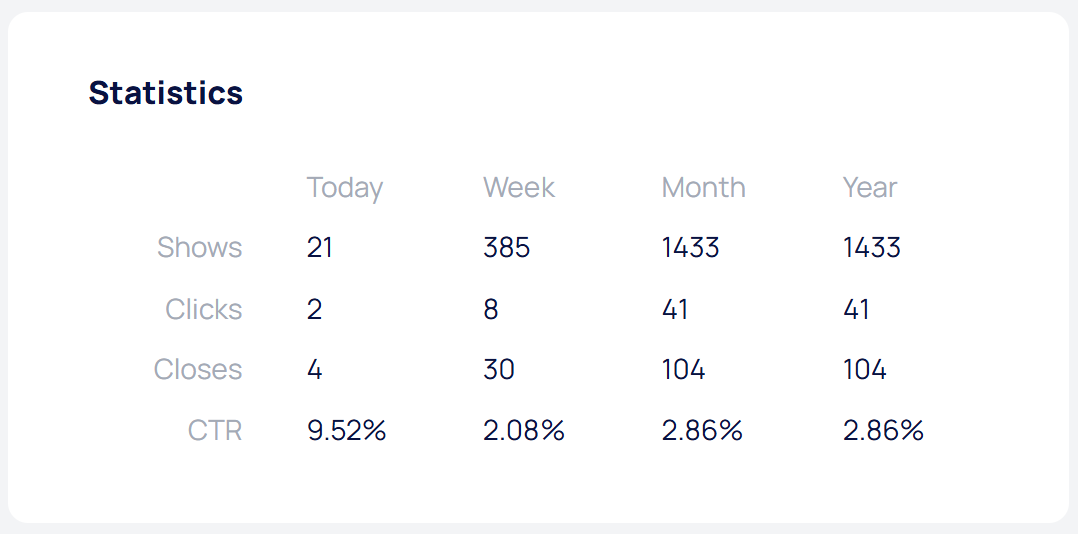
Tracking each rotation variant's effectiveness is critical for optimization. WEBSET automatically collects detailed statistics for each popup: impressions, clicks, conversions, CTR, and interaction time. Integration with Yandex Metrica and Google Analytics connects displays with site goal actions without additional setup 📊
Case 5: E-commerce — cross-sell through rotation
Company: Bear Mattress (online mattress sales).
Challenge: increase average order value through complementary product offers.
Solution: comprehensive CRO strategy included rotating cross-sell popups with different complementary product combinations (pillows, mattress protectors, bedding) when adding a mattress to cart.
Results:
- 24.18% increase in completed purchases
- 16.21% revenue growth
- 8% average order value increase
Key insight: strategic popup rotation focusing on cross-sell opportunities at critical funnel points substantially impacts both conversion and transaction revenue.
🎯 Common pattern across all successful cases — combining proper rotation algorithm (weighted or behavioral) with deep personalization and continuous testing. Simple random rotation without targeting rarely produces gains above 10-15%
2026 trends: the future of popup rotation
The popup industry is actively evolving. Let's examine key trends already changing rotation approaches.
Real-time AI personalization
AI systems analyze visitor behavior in real time — browsing history, content interaction, time on page, scroll patterns — and dynamically select not just popup variants from the pool but their content, visual style, and display moment.
ZQuiet case: implementing AI-optimized testing increased registration conversion from 2.5% to 19% (660% growth) through continuous adaptation to behavioral signals.
Application: instead of creating separate variants for segments, AI generates personalized content for each visitor based on intent prediction and conversion probability.
Interactive and gamified popups
Shift from static messages to interactive elements: gamification (spin-to-win fortune wheels, scratch cards, quizzes), animated and kinetic designs, 3D visual effects, parallax effects, dynamic interaction points, progressive information disclosure.
Faguo case: gamified Spin-to-Win popup in rotation with informational banners achieved 25.3% average CTR and generated £31,443 revenue.
Important: interactive elements require performance testing — animation JavaScript shouldn't slow pages. Use CSS animations where possible, lazy-loading for complex elements.
Mobile-first approach becomes mandatory
Mobile popups now convert 38% better than desktop (3.75% vs 2.67%), requiring radical strategy changes. Not adapting desktop versions to mobile, but designing for smartphones first with subsequent desktop scaling.
Mobile-first rotation approaches: prioritize touch-friendly interactive elements (swipe, tap, long press), simplified forms (1 email field instead of 3-5 fields), vertical layout instead of horizontal, large CTA buttons (minimum 48×48px), bottom-screen positioning for thumb convenience.
Behavioral analytics and predictive triggers
Moving from simple triggers (time, scroll) to complex behavioral signals: purchase intent prediction based on browsing patterns, exit probability determination and preventive display, real-time visitor segment classification, content engagement depth analysis, action correlation with historical conversion data.
Example: if a visitor viewed 3+ products in one category, added item to comparison but not cart — system predicts high purchase intent with hesitation and shows popup with social proof and reviews specifically for that category.
Strengthened GDPR and privacy by default
2026 brings stricter requirements: equal visual prominence of consent and rejection buttons becomes mandatory (penalties for dark patterns), technical cookie blocking before consent (not just banner display), mandatory consent logging for audits, Consent Mode 2.0 integration for Google tools.
Trend toward cookieless solutions: server-side rotation at CDN level without client tracking, using server sessions instead of cookies, contextual personalization without user identification, Privacy Sandbox API replacing third-party cookies.
Performance optimization and Core Web Vitals
Focus on minimizing popup impact on loading metrics: using native HTML
<dialog> element instead of heavy libraries, async
and defer script loading for popups, code splitting to separate
rotation code from main bundle, lazy loading popup content until
display moment, priority hints API for resource loading management,
measuring INP (Interaction to Next Paint) for responsiveness
assessment.
According to Web.dev, popups can affect all three Core Web Vitals, making rotation performance optimization critical for SEO.
Multi-channel rotation and omnichannel
Coordinating popups with other communication channels in unified strategic flow: popup collects email → email sequence with personalization → SMS reminder → web push notifications → retargeting ads. Unified rotation system manages all touchpoints, avoiding message duplication and conflicts.
Platforms like Wisepops already offer multi-channel rotation — popup, email, SMS, web push managed from one interface with shared attribution analytics.
🚀 Key 2026 trend — shifting from "show popup" to "orchestrating personalized experience." Successful rotation becomes part of comprehensive Customer Data Platform, where popups are one channel in overall engagement strategy
GDPR and 2026 requirements for popups
Popup rotation often requires user tracking for frequency capping, which has serious legal implications, especially in the context of strengthening EU regulation.
Key GDPR requirements for cookie banners
According to updated 2026 requirements described in the CookieBanner.com guide, cookie banners are mandatory if sites use any non-strictly necessary cookies. Critical requirements:
Equal visual prominence of buttons
"Accept all" and "Reject all" buttons must have identical visual prominence — size, color, contrast. The reject button cannot be smaller, paler, or less noticeable. This is a fundamental requirement of "freely given consent."
One-click rejection
Users must be able to reject all non-essential cookies with one click from the first banner screen, without needing to open settings. Hiding the reject button in settings menus violates requirements.
Technical consent enforcement
Simply showing a compliant banner isn't enough. All non-essential cookies must be technically blocked until explicit consent is obtained. Consent signals must be transmitted in real-time to all tracking tools (Google Analytics, Meta Pixel, advertising platforms).
Granular control by categories
Users must be able to consent by categories: analytics, marketing, functional, personalization. You cannot combine everything into one "consent to all" category.
Consent logging
Documentation required: consent/rejection timestamp, selected categories, banner version, domain, IP address (for audits). This data must be stored for at least 3 years to prove compliance during inspections.
⚖️ 78% of sites with popup rotation systems don't comply with GDPR requirements due to using cookies for display tracking without explicit consent. Ensure your rotation system either doesn't use cookies before consent or obtains explicit permission
Accessibility as part of GDPR
GDPR consent is considered "freely given" only if users with disabilities can access the banner and make informed choices. WCAG 2.2 requirements for popups:
Keyboard navigation
All popup elements (buttons, links, toggles) must be accessible via Tab key with visible focus indicators. Escape key should close popup. Focus must be trapped inside modal window until closed.
Screen reader compatibility
Use proper ARIA attributes: role="dialog",
aria-modal="true", aria-labelledby for
heading. Screen reader should announce popup opening and describe its
content.
Color contrast
Minimum text-to-background contrast is 4.5:1 for normal text (WCAG AA). For interface elements (buttons, icons) — minimum 3:1.
Touch target sizes
Buttons and interactive elements on mobile devices must be minimum 44×44 pixels for comfortable tapping.
Cookieless rotation as solution
Most reliable privacy approach — server-side rotation without client-side cookies. Decision made on backend or CDN level based on: IP address (for IP-level frequency capping), session identifier (server session without cookies), User-Agent headers for device detection.
Benefits: doesn't require GDPR consent for basic functionality, no dependency on browser privacy settings, works even with cookie blocking, complies with W3C privacy recommendations.
Practical GDPR compliance checklist
- Cookie banner displays before setting any non-essential cookies
- "Accept" and "Reject" buttons visually equal (size, color, position)
- Rejection possible in one click from first screen
- Technical cookie blocking before obtaining consent (not just visual banner display)
- Granular settings by cookie categories (analytics, marketing, functional)
- Logging all consent/rejection events with timestamps
- Consent signal integration with Google Analytics, Meta Pixel, and other tools
- Privacy policy link accessible from first screen
- Consent withdrawal mechanism easily accessible from all pages
- Full keyboard navigation and screen reader compatibility
- Sufficient contrast and button sizes for mobile
Non-compliance with these requirements can result in fines up to 4% of annual company revenue or €20 million (whichever is greater) according to GDPR Article 83.
Real rotation implementation cases
Let's examine examples of successful popup and banner rotation implementation across different industries.
SaaS platform: time-based rotation for trial conversion increase
A B2B analytics platform implemented time-based rotation with 7 popup variants based on time of day and user timezone. Morning visitors (9-11 AM) saw productivity messages, afternoon users (2-5 PM) received ROI calculators, evening visitors (6-9 PM) saw client success stories.
4-month results: free trial registration increased by 56%, trial-to-paid conversion improved by 28%, popup closes without action decreased by 33%.
Media publisher: frequency rotation against banner blindness
A major online publication implemented cookieless rotation using localStorage with strict limits (maximum 1 popup per 30 days) combined with 12 banner variants for different article categories (politics, sports, technology). Sequential rotation within categories ensured fresh content.
8-month results: email newsletter subscription increased by 67%, returning visitor rate improved by 34%, pages per session increased by 2.3, popup complaints decreased by 89%.
E-commerce: geographic rotation with GDPR compliance
A European online store implemented geographic banner rotation: EU visitors saw GDPR-compliant popups with explicit consent, UK users received post-Brexit offers, American audiences saw different pricing promotions. The system used weighted rotation of 5 designs per region with automatic weight adjustment based on weekly statistics.
6-month results: email subscription conversion increased by 42%, bounce rate decreased by 18%, average session duration increased by 25 seconds, zero GDPR complaints received.
Best practices and UX tips for rotation
Technically perfect rotation won't deliver results if user experience suffers.
Avoid banner fatigue
Even with rotation, maintain strict frequency limits. Never show multiple popups in one session, even if they're different variants. One popup per session. After explicit user closure, increase the interval before next display by at least 2x.
Test timing, not just content
Rotate not only messages but display conditions. Perhaps variant A works better when shown after 30 seconds, while variant B performs better with exit-intent. Combined "variant + trigger" rotation can yield unexpected insights.
Use progressive techniques
Instead of showing full popups immediately, use a two-step approach: first a small unobtrusive notification (bottom slide-in), if user shows interest (hovers cursor)—the full popup expands. This reduces irritation and increases interaction quality.
Ensure accessibility
Rotating popups must be accessible to assistive technology users. Use
proper ARIA attributes (role="dialog",
aria-modal="true"), manage keyboard focus, provide Escape
key closing. According to
WCAG 2.2, modal windows shouldn't create "keyboard traps."
Monitor negative metrics
Track not only conversion but negative indicators: immediate closes (within first 2 seconds), correlation of popup display with increased bounce rates, increased time to main content interaction. If a variant causes negative reactions, remove it from rotation regardless of CTR.
Conclusion: effective rotation strategy for 2026
Popup and banner rotation isn't just a technical feature but a strategic conversion optimization tool that, when properly implemented, can increase results by 35-163% depending on personalization level and algorithm.
Key principles of successful rotation
- Data as foundation: average popup conversion is 3.49-4.65%, but the top 10% achieve 15-42%. Your goal is reaching the upper quartile through testing and optimization.
- Algorithm by situation: start with random rotation for data collection (2-4 weeks), move to weighted for optimization, consider Multi-Armed Bandit with high traffic and multiple variants.
- Personalization is critical: URL targeting provides +152% conversion, custom behavioral targeting up to +163%. Combine rotation with audience segmentation.
- Mobile-first: mobile popups convert 38% better than desktop. Design for smartphones with simplified forms and touch-friendly interfaces.
- User respect: maximum 1 popup per 30 days, delayed display minimum 10 seconds, easy closing, frequency limit compliance.
- GDPR 2026: equal consent/rejection buttons, technical cookie blocking before consent, event logging, accessibility for people with disabilities.
- Performance matters: use native HTML
<dialog>, async loading, control Core Web Vitals — popups shouldn't slow pages. - Metrics and iterations: track CTR, conversion, time to action, bounce rate correlation for each variant. Adjust weights weekly.
Practical implementation roadmap
Weeks 1-2: create 3-5 popup variants with different headlines, offers, or visual styles. Launch random rotation for uniform data collection.
Weeks 3-4: analyze results, identify best and worst variants. Switch to weighted rotation with priority to winners (60-70% impressions to best, distribute remainder among others).
Month 2: add personalization — different variant pools for mobile/desktop, new/returning visitors. Test different display triggers.
Month 3+: implement advanced techniques — behavioral targeting, CRM integration, multi-step popups, gamification. Consider automatic optimization through MAB algorithms.
Tools for quick start
If you're not ready to write rotation code yourself, use no-code platforms. WEBSET offers a complete set for effective rotation: visual popup builder without programming, built-in random and weighted rotation algorithms, automatic conversion tracking for each variant, flexible display triggers (time, scroll, exit-intent, click), frequency capping and GDPR-compliant implementation, integration with Google Analytics and Yandex Metrica.
Alternatives for different needs: Wisepops (from $49/mo) — AI personalization, multi-channel campaigns, premium features. OptiMonk (from $39/mo) — extended functionality at accessible price, good feature-cost balance. Poptin (from $25/mo) — budget option with basic analytics for small business.
Next steps
Popup rotation isn't a project with an end date but a continuous optimization process. 2026 trends (AI personalization, gamification, mobile-first, strengthened GDPR) require strategy adaptation every 3-6 months.
Ready to implement popup rotation that increases conversion without irritating users? Start with WEBSET for free — create unlimited variants, test different rotation algorithms, and track detailed analytics without a single line of code. You'll see first results within 2-3 weeks of systematic testing 🚀